Full Scorecard with Batting & Bowling Stats
After your match wraps up, Gully Crix generates a complete scorecard with innings-level batting and bowling summaries. Total runs, balls, boundaries, wickets, overs bowled, economy — all in one place. Scorecards are saved locally so you can revisit past matches any time.
Gully cricket has always lived in people's memories and never in the record books — and that means the great innings, the tight spells, and the bragging rights fade fast. The full scorecard changes that by capturing the detail of every match the same way the proper game does, without you having to do anything beyond scoring the game ball by ball.
When a match wraps up, Gully Crix builds an innings-level summary for both sides. The batting view gives you total runs, balls faced, fours and sixes, and the strike rate for the innings, so it's clear who set the tempo. Switch to the bowling view and you get overs bowled, wickets taken, runs conceded, and the economy rate — the numbers that show who actually applied the pressure. Together they tell the full story of how the match was won.
Every scorecard is saved locally on your device, so you can revisit any past match whenever you like and relive it over by over. And when you want to show someone, the scorecard is easy to share as a screenshot straight from your phone.
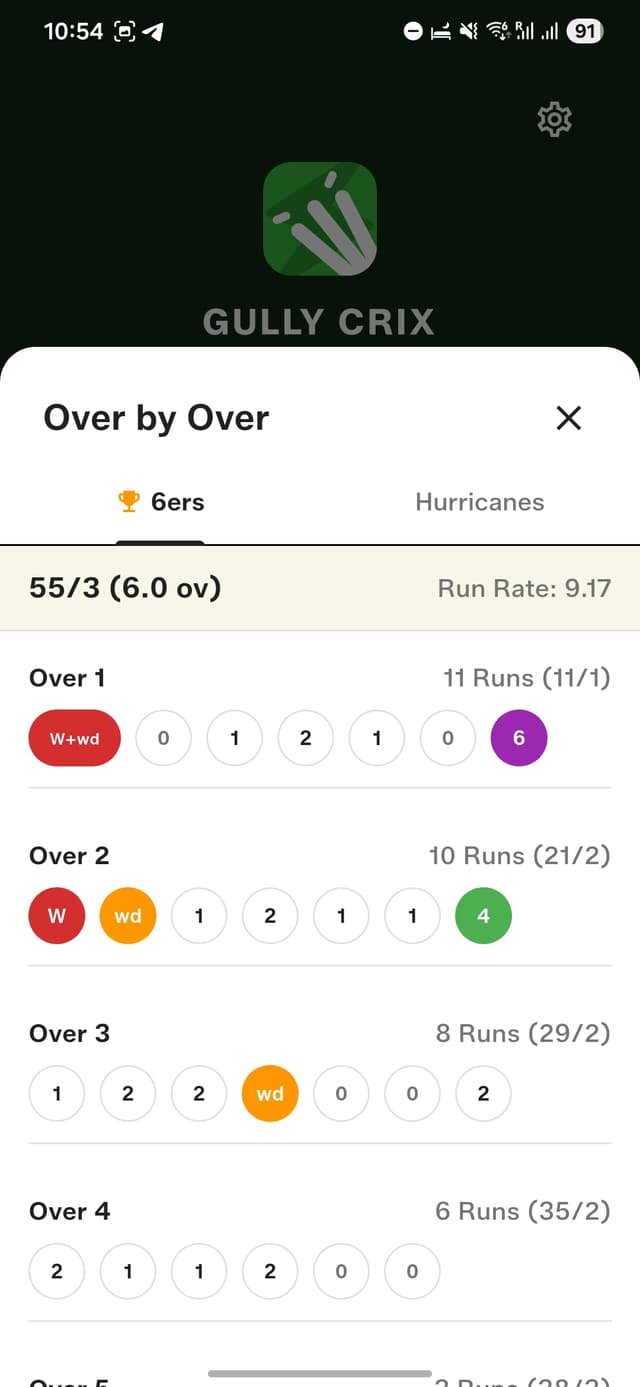
Over-by-over ball breakdown for every match
How to get started
- Complete your match normally.
- Tap "View Scorecard" on the match result screen.
- View batting summary: total runs, balls, 4s, 6s, and strike rate for the innings.
- Switch to bowling view: overs bowled, wickets taken, runs conceded, and economy rate.
- Share the scorecard as a screenshot from your phone.
Frequently asked questions
What stats does the full scorecard include?
Batting summaries show total runs, balls faced, fours, sixes, and strike rate, while bowling summaries show overs bowled, wickets taken, runs conceded, and economy rate — for both innings.
Are my scorecards saved after the match?
Yes. Every scorecard is saved locally on your device, so you can open past matches and review them over by over any time.
Can I share a scorecard with my team?
Yes. You can share the scorecard as a screenshot from your phone straight into any chat.